Showing posts with label Blogging. Show all posts

Wednesday, 20 May 2015

How to Create High Quality Backlinks for your Blog

On internet, creating high quality backlink is indeed a very hard nut to crack for any webmaster or SEO expert but there are a bunch of cool and easy ways to do it. So make really valuable backlinks for your blog/website a few resources can help you as below.  You need to know a few things before you start out genrating some for your blog or website.


What to Check before Making a backlink?

You need to check some crucial thing before you think of creating or asking to create a link back to your site/blog. A checklink to check out before is as below.

The PageRank of the domain you're going to get link back.
Domain authority and Page Authority allotted by MOZ.
The Link thus created will be contexual or not.
If the domain is .GOV or .ORG one

Above four things will make a pretty much sure about the quality of the link you will create.

How To Create High Quality Backlinks?

No comes question of generating some extra qualitative links in for your online portal. One can easily gather a tons of links in with bots but all them remains useless, worthless and just a part of trash. Spammy links are easy to create and there comes some difficulties getting one worthy.
How to make high quality backlinks
As clear it is from the above graphic presentation, There are 10 working ways to grab some worthy links. You can download the above Infographic Click here. Or embed this infographic on your website or blog with the below code.


<center>

<p>

<a alt="How to Create High Quality Backlinks For your Blog" target="_blank" href="http://www.yesiamblogger.com/2015/05/how-to-create-high-quality-backlinks.html"> <img src="https://blogger.googleusercontent.com/img/b/R29vZ2xl/AVvXsEiUrb7dRKagxjhV-PPXHoJBg01woopvDT6Ri1-6KnJyFzzzjh4X0-HBkoWE0u30Fp5DAS6yc766JtV6MYlACHxwYadZNdMzi2ziFHQPjwpgcUUxX4XdD8DARIvoUEAHA1Xc2eL9jwx9XE4/s1600/HQ+backlinks.png" /></a></p>

</p>

<p>

</center>

Infographic Source: <a href="http://www.yesiamblogger.com/2015/05/how-to-create-high-quality-backlinks.html" title="YesIamBlogger" target="_blank">YesIamBlogger</a>

Hellow. The Story is not over still.

Read how you can create a bundle of precious backlinks for website.

1. Create Ebooks

There are a lot of places to upload your PDF Ebooks and get some backlinks and traffic. Writing ebooks give two fold advantage. Not only Links but also traffic is gained by your blog by way of document submission.

2. Offer FreeBies

Mostly people like something for free and they are attracted towards it. Almost Fifty percent of them share whatever is being provided for free over internet. You can have any part of your work as freebie. I bet, people will link to your blog automatically. Best practices shows that anything getting viral is because of auto promotion by audience.

3. Guest Blogging

In fact, guest blogging is the best tactic one can execute to get worthy links. But getting an approval for your posts on other blogs is not that easy. You shall have to write top quality posts to get a place in those blogs. But the result is precious.

4. Video Blogging

Video Sharing is also a fabulous path to get unlimited high quality backlinks. Youtube backlinks are never worthless. You get a link from one of the Top 100 websites in the world. To create some worthy one's refer to Top 4 video sharing websites.

5. Participate Online Forums

One can test his skills helping others on Internet Forums of related topic. Whereever its resonable, give link to your blog post to help some needy one's.  This is the most working and used trick of webmasters.

6. Write Interesting and Long Post

Once you get success putting the impression of your words ont he head of your audience, he is most likely to share your post with his friends and incase he himself is a blogger, chances to get shared on a popular blog becomes high. Thus you create links automatically. But you ought to be quiet careful with the content. Making it long and interesting should be your first priority. Wile making it thousand words, make sure it does not lack the objectivity factor.

7. Join All Social Networks

Joining all of the networks leverage you with atleast one backlink per social network you join on your own profile page you create there. You can get many more opportunities on social media.

8. Share your articles in Articles Directories

Share your articles short and distint version on as many article directories as you can. There are more than 30 article directories where your articles will be approved instantly and one ought not to wait for approval.

9. Blog Commenting

You always have this way to communicate with any blog owner. Commenting option enables you to stick a HTML backlink on the blog. Sometimes the link becomes a homepage link for a while in case when the blog has a recent comments widget on the homepage of the blog. That backlink is very powerful.

10. Create Shareable Infographics

People understand more by visuals. So you can create infographics to let them know in a creative way. You can allow them to embed it on their blog and ask them to share or download it. Put link and coding to share the infographic and see results.

8 Hot things you can do for free on Internet

8 cool things to do on internet
The story of ultimate entertainment and education is not over yet on internet. There is a lot more remaining to be done by you on internet. Besides getting social on Facebook and twitter, there exist many things you can do on internet while its your spare time and even for free. Popular scholars and persons have proved that the most cool things are always free of cost.


1. Learn Coding

Learn coding onlineYou can learn coding of any kind on CodeAcademy. Not only Code academy but also W3Schools and Codeschool provide free code training and tutorials. If you've money to spend, then Code School can also provide you a digital certificate of getting knowledge of computer languages. You can find answers and perfect solutions of your coding problems for free on Stackoverflow as well which is a Web design language forum run by StackExchange.

2. Read Ebooks

Read online books for free
One can easily entertain oneself by reading online Ebooks on OpenLibrary or Calibre-Ebook. There is a bundle of important educational ebook available for free to download on Bookboon. The resources does not end yet, You can download Ebook for your kindle on MandyBooks as well. Few premium ebooks stores are also selling books from bestsellers that you can buy online on Flipkart, Ebay and Amazon.

3. Expert a Language

Learn a language onlineAlso give new heights to your interest towards languages study on internet with Duolingo. One can learn to speak and write German, Italian, French and many more languages for free on Duolingo. Livemocha and LearnaLanguage are also alternatives to Duolingo,

4. Gaming

Play online games for freePlay games when you feel tired of putting pressure on your brain. GamesGames and Miniclip Provide you free gaming online to relax yourself and give you a peace of mind. Gaming is the ultimate mean to relax up your mind and get a new refreshed energy. You can Recharge yourself with playing online games. 

At times, you may feel a need to speed up your apple macbook pro as well because gaming may slow it down severely. 

5. Join Free Course Online with Top Universities

Top universities
You can register yourself on Coursera for educating yourself online with Top International universities. University of Melbourne and Manchester can be the best place to conduct your study online. Its a matter of pride that you'll have some study in well known universities of the world. You can show this off to your friends as well. Whatever, you'll gain useful knowledge here.

6. Get Medicines

Get medicines
Now you can save 80% on your medical prescriptions on GoodRX.
This huge discount on medicine can save your pocket from getting loose in hard times. This by some manner will surely make your mind and soul happy.

7. Listen to your Favorite Music

Anytime you'll never feel bored. Because you've the biggest music library on internet with Spotify. On Gaana website you can create a playlist of your favorite tracks and listen to them online. Music makes your soul dynamic and give a new life to the soul.


8. Travel Across the World

You can see the world map on Google maps for free. With a live street and picture gallery view, you can have a glimpse of popular places around the world. From the TajMahal to the Mount Evrest. TripAdvisor can tell you about vacation travel plannings as well.

Saturday, 9 May 2015

How IceGram helps generating subscribers and engaging visitors

The two fold advantage of ICEGRAM WordPress plugin is immortal and divine. None better than IceGram can engage your website visitors in the manner you actually want them to. The Best blog engagement tools are absolutely hard to find but something that will definitely work for you for free is IceGram.

Icegram not only attract the attention of your website audience but also catch their eyes with powerful Call to actions that converts. For those who were looking for a better converting WP plugin that generate thousand leads a day, the search is over.

The First Attraction - Hello Bar

Actually this is much more than a typically simple hellobar. Hellobar has been the top notch blog engaging tool. Upgraded features means better engagement and hence I regard IceGram as the most helpful visitor attention catcher tool.
Talking about the way how IceGram use this main component of lead generation, It is really fantastic. The divine part of this thing is that, there are more than a single theme available. which mean you can change the appearance of that hellobar according to the color schemes of your website. Many bloggers had the issue of color scheme choice is HelloBar blogger widget which was available only in Orange color. Wiping out the issue of colors and themes, this tools is just perfect. Some of the themes are free and many of them are available for a few cents.
Hello bar does not ends its features here. So wonderful is the timing you can set for a hellobar to appear on the website. You have the power to chose which campaign to be run on a specific user by traffic source and landing page.

#2 - Message Chat CTA BOX

This is like a chat box expanding from the bottom right corner and asking the user to read. As usually a user is surprised to see a message from his friend on his social network, the same feeling shall be there. As if the site admin itself is talking with him. Now one can easily type a compelling call to action note and ask visitors to check them out once.
The chat box CTA's are available in three designs for free. You can give it a touch of Facebook chat, Gmail Hangouts chat and a simple chat box.

Expand Collapse Popup with Images 

This feature is the top notch approach to making a website live online. It just put life into a website which nothing but a digital object apart from internet. This example Jquery expand collapse sidebar can definitely attract visitors and drive much traffic on your promotions via your website.

This is what a user will see. He will see a wrapper coming into the browser screen from right or left as you would have set it to. It will be the dynamic action or occurrence on the site to tell the audience that - "Hey! I'm Alive, See I've something to show you that you may be interested in."

This type of tool empowers you to connect with your visitors on autopilot. Something that's worthy. Here you build reputation and earn name.

Biggest advantage in this tools is - Its responsive. This probably is a premium widget which can be used by a paid member only.


#4 Email Subscription Popup Box on Interval you want

This is what every internet marketer look for in a lead generation machine. If a tool can't generate leads, its useless for professionals. The marvelous fact is - This plugin can be integrated with your mailchimp account to capture email subscribers very easily. Not only mailchimp, it supports many other email marketing services to generate email lists and send them out a newsletter.

#5 - unlimited campaigns

The number of campaigns to be scheduled on the website is unlimited which mean you've the freedom to connect with your audience. But excessive use of call to actions has no positive effect on your blog readership or repo. It is totally upto you as none better than you know how to communicate with your audience.

Final Words

Icegram is a nice lead generation tool beat hello bar and other tools after it. I recommend this to all of you. Upto many extents its free. So, Download this Now.

Monday, 20 April 2015

8 Cool Tumblr Themes

The lover of web designing and blogging has collected a cool collection of tumblr themes. Tumblr isn't only a microblogging platform where bloggers share their thoughts and things but also is a nice platform to create a stylish looking blog.

There are a lot of tumblr themes available for free on tumblr directory but are somehow weird and can not be used to create professional blogs on them.

Cool Tumblr Themes

There are a lot of tumblr themes available to be used on your tumblr blog to make it look professional and distinct from others. 

Barron Responsive tumblr theme

Barron Responsive tumblr theme

barron is a multipurpose tumblr blogging theme that is very simple so far as i am able to praise. A full width header image and logo of title of the blog on the middle of the screen makes it look one page telmplate. But right after that header background image, overlapping content post wrapper crarifies that the theme is single sidebar elegant design for a tumblr blog where widget can be seen on the right sidebar. Two column layout looks cool and stylish as well.

Download this theme
Theme Demo

Bougenville | Beautiful and casual

Bougenville tumblr

as clear it is with the name of the theme, this theme is quite stylish and weird in nature. Formality lacks in this theme which is a positive sign for a style or fashion blogger. Sticky post option makes this theme look interesting while left sidebar does not make me feel better. Pink color means this theme is made specially to attract female bloggers and hence the theme is beautiful. Social icons on the top of the screen and fixed navigation bar makes it clean and much professional as well.

Download this theme
Theme Demo

Agantuka Elegant tumblr Template

Agantuka Elegant tumblr

This theme did not impressed me enough as the theme is single column and can not consist much engaging widget in it. All i like in this theme was a image lighbox with keyboard arrow response.
Theme is quite simple, clean and cool.

Download this theme
Theme Demo

Putih Clean Personal Tumblr Layout

Putih Clean

I must say, this theme have some quality. firstly this theme is available in two version. First version is single columned and second is right sidebar layout. I like second look of this theme.
Every widget in this theme has something unique. For a quick instance, Twitter posts are in slider mode while advertisement space is also clean.
Social icons just below the title and description of the theme makes it elegant.

Download this theme
Theme Demo

Tresno personal blog 

Tresno personal blog with tumblr

Tresno is the first magazine blogging cool tumblr template i've ever seen on the internet. Before this i have not seen such feature in a tumblr themes as tresno has. No one can guess that the blog is made on tumblr because this is awesome and no one can roll over his eyes from this blog theme.
Featured post images on the header with a link to the post and post having multiple images is in the form of an image slider there.
Color scheme is heart touching while social icons has been used very attractively.

Download this theme
Theme Demo

Frank theme

frank theme

At first sight, you'll never say this theme has a left sidebar in its layout. But this theme has a left sidebar and a beautiful grid post view. According to the theme author, this theme is a minimal one column template but there expands a left sidebar when bar button's icon is clicked and just below there, a button when clicked make the posts view in stylish grid view. 
The most unique feature of this theme is, "Either scroll the sidebar, or the content wrapper."

Download this theme
Theme Demo


Gridify Fullscreen Grid responsive theme

Gridify stylish theme

This is the theme i was waiting for. Each and every post type is fitted in a box and are available to be seen, liked and commented as according to the type of posts. This theme is like Frank theme to many extents because this theme has a left sidebar which is visible when the bar button at the top left is clicked. The most featured think in this theme is disquss comments option which is unique. Everything else on the template layout is single columned.

Download this theme
Theme Demo

Quila Multi version theme

quila tumblr cool theme

Thsi theme is also available in both version - single column and double column. The attractive part of this theme is that a blog designed on this theme is loaded with animations. There are 18 social icon which are inbuilt. All you've to do is to put the URL for social profiles and the icon is shown on the appearance of the blog. The price of this theme is $20 which is sold more than 75 times on themeforest themes directory.

Download this theme
Theme Demo

Hope my words and collection interested you a bit. What you think about it?

How to Embed your Twitter Post on Your Blog

Besides search engine optimization, social media optimization is also a vital part of  promotion of a blog or website. You can get high success by engaging with your website audience but what if they are unable to connect with you on social networks? Hence the need of social widgets on a blog is very high. Once you successfully optimized your blog's blank space with social media widgets, you are one the track of achievements and no one can check you then.

Twitter social widget for blogger

Advantages of Embedding Twitter Profile on your Blog

There are numerous advantageous of  embedding your twitter profile on your blog.
  • Audience can easily interact you on twitter and can share their view with you on twitter.
  • Your audience feel something that is transparent on your blog.
  • There is no ghost author on the blog and its written by real one.
  • The blog is live and administrator will hear what i will put before him.

How to Use Twitter Custom Profile Embed Widget on Blogger

As usually we do it, Goto add widget in the blog layout section and select HTMl/java script there.
Now you need to put the code below there


<a class="twitter-timeline"
width="250"
height="700"
data-theme="light"
data-chrome="noscrollbar"
href="https://twitter.com/yesiamblogger"
data-widget-id="558498227154976769">
Tweets by @yesiamblogger
</a>


Go to https://twitter.com/settings/widgets and click add widget there. Simply Save it without doing anything there.

Now see the URL of the page and copy your widget ID there. and replace it with the green text in the code snippet given above.

Replace yesiamblogger with your own twitter username and click save.

You're done embedding your twitter profile on your blogger blog.


Hey Stop! You can customize it as well.

There are few things you can customize manually. To change the color of the border of the widget on the blog appearance use below code and select your own border color there.
data-border-color="#cc0000"

You can set tweets limit you want to be shown on the widget with the below code into the coding of the widget. Below code says that only 5 tweets will be shown there.
data-tweet-limit="5"

Links color can be change with the below code.
data-link-color="#cc0000"


This is not it, you can set width and height of the widget. refer to the widget code and see width is 250px and height is 700px there. You can change these properties as well.

In order to hide the scroll bar, use below code, which is already placed in the above widget code.
data-chrome="noscrollbar"


Hope this important information meant you  a lot. Share your ideas about this post below in the comment box. 

Wednesday, 15 April 2015

5 Reasons, Why Every Small Business Needs Youtube Channel


Small Business Needs Youtube Channel

YouTube is the third most viewed site and the second search engine in the world that’s why from a network marketer to brands like Red Bull and PlayStation everyone is leveraging it. Every business needs a channel to increase their sales, brand promotion, search engine visibility, brand reputation and customer/consumer engagement. They are constantly updating their video marketing strategies to stand apart from their competitors.


It’s Free


Youtube is free and anyone can upload and watch videos expect those paid channels where you need to pay to watch videos, which is negligible. Companies spend thousands of dollars on content marketing, social media marketing; website designing et cetera but Youtube is absolutely free to promote any business.

Content Marketing On Steroid


If an image is worth of 1000 words then a video is worth of million or we can say content marketing on steroid because it is proven that visuals are easy to understand and consume. This is an era of content marketing and that’s why marketers are now focusing on qualitative and engaging content which helps in social media marketing.


Earn Money


Youtube star PewDiePie is making $4 million a year and there are many Youtubbers who are making money from their videos. If you want to supplement your income stream, Youtube could be a great income source. To earn money from Youtube, you need to have copyright free content which needs to be monetized.

Youtube Channel


Call To Action


YouTube's annotation and card features help us to add CTA (Call-To-Action) to our videos. We can influence viewers to take action by telling them to click on subscribe, watch next video or to visit our website. It is easier to add CTA (Call-To-Action) to video compared to any other content.
Educate Your Audience


When a non-subscriber visits your channel you can promote your services via a trailer video. You can tell them what’s channel is about and what are the services you provide.


YouTube is flooded with How-tos, ways-tos and review videos. These videos not only educate customers/consumers on how to use the products/services but also increase the product awareness.


If you don’t want to be on camera Camtasia and Screenflow are market leading screen capturing software to make those educational how-to videos.


Here are few YouTube Facts


YouTube has more than 1 billion users


Every day, people watch hundreds of millions of hours on YouTube and generate billions of views


The number of hours people are watching on YouTube each month is up 50% year on year.


300 hours of video are uploaded to YouTube every minute


~60% of a creator’s views come from outside their home country


YouTube is localized in 75 countries and available in 61 languages


Half of YouTube views are on mobile devices


Mobile revenue on YouTube is up over 100% y/y


Since going live in December 2005, YouTube has grown to a point where it is getting 800 million visitors per month (as of April 2012) and is now streaming 4 billion videos every-day.


One hour of video is uploaded to YouTube every second, or 24 hours every 24 seconds, or a decade worth of video everyday


¾ of YouTube’s traffic comes from outside of the U.S.


22 billion search inquiries are conducted on YouTube each month


YouTube gets 86% of the visits to video sites in the U.S.


YouTube is replacing TV viewing for many users


Google is the top referral source in driving traffic to YouTube, followed by Facebook


Source: - http://www.youtube.com/yt/press/en-GB/statistics.html


Small businesses need marketing sources to reach out to people. Fortunately there are sources like YouTube, Vimeo, DailyMotion and Email marketing which is free to use but the effective use of these sources can impact the business drastically.


So I hope, I have covered everything but if you think I’ve missed something please feel free to comment below. Your comments encourage us to come up with great content which helps the community to grow.


About the Author


Yogesh Shinde is Digital Marketer, Blogger, Youtubber and much more. He loves to make videos on blogging and Youtube. Visit his Blog and Youtube channel to learn Youtube branding and marketing.


Tuesday, 14 April 2015

How to Use Image with perfection in Onsite SEO


Use images in Onsite SEO

The Search Engine Optimization is the game to trick the search engine crawlers. But this does not mean you, a beginner can't optimize your blog posts to be fit to be regarded as important in the eyes of Google.

Actually, Google is not a human being who visit every page on the web manually. Its a robot made by humans to crawl web pages and index them.

Algorithms are made to judge the quality and relevancy of the pages for some specific keywords. Those algorithms are the mind of Spiders and crawlers.

Search engine bots are not intelligent enough to see the images and even they have no eyes to watch those sexy images embedded on your pages.

Search engine crawlers does not have the capability to anticipate the keywords you're trying to expose with that picture. So, in lack of any instruction about the image, Google isn't in the position to regard your post as useful and important. As a result, your post will not rank on top 3 SERPs.


How to SEO Optimize Images and Pictures?

One can optimize all the images on the posts for the perfection of On site SEO practices. One property is called as title and the second is named ALT.

Title tag is the text you'll see when you hover an image on the webpage which defines the nature and objective of the picture on the post. The title tag is of great importance in onsite SEO.

ALT tag is the text which is seen by your audience whenever the image is not loaded fully or due to slow internet connection, the image is unable to visualize on the page. This Alt is not only the text which is alternative to the image but also the backbone of on site SEO efforts.

Always use keyword in your images ALT tag because this is the only thing what crawlers are able to read and nothing else can they see about your images.

Final Words :


by the way of my above words, all i had to deliver was that, "Images are not enough to create an effective blog post until you include ALT tags and Title tags effectively. Crawlers are not qualified enough to scan those images. All they see on your webpage is HTML coding. Include keywords that define the nature of the image in ALT tags."


Wednesday, 8 April 2015

How to Migrate from Wordpress.com to wordpress.org

Just because of increasing popularity of WordPress and people asking me about WordPress, I am writing my first WP tutorial. If you want to touch the peeks of blogging rock, you need a self hosted WordPress website(blog) to get it on the go. Word-press dot com and WordPress dot org are two separate blogging platforms. WordPress dot com provides free hosting to empower your writing skills and give your articles an identity and the credit of the blogging platform remains with WordPress dot com. On the other hand WordPress dot org is a content management system that works on PHP and SQL in which Database is managed and visualized as a managed form of content. Wordpress dot come blogs are not subjected to show advertisements thereon while wordpress org blog has the full control over the content and advertisements.
(How to Install Wordpress in My Hosting Account?)
Migrate from wordpress dot com to wordpress org


To Do Before Migrating to Self Hosted WordPress

  1. A Hosting account (From Godaddy hosting or Blue Host) and a purchased Domain(From Godaddy, Namecheep or Bigrock).
  2. Exoprted Data File Including Posts, Pages, Comments Etc.
  3. Delete the Wordpress.com blog and remove it from Search Engine Databases
  4. Newly Installed Wordpress CMS on your hosting Account.

Export Data in XML file from WordPress dot Com

This task generate an XML file that can be uploaded on your wordpress.org self hosted blog. Now Lets Start it out.

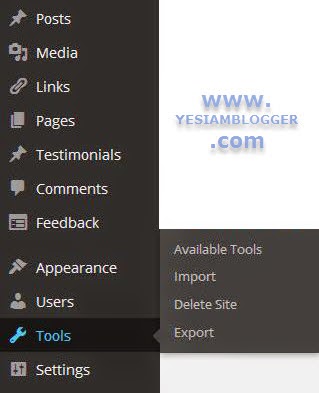
Go to Wp-Admin dashboard of your blog and Find Tools menu there. Click Export in that submenu.


Export XML


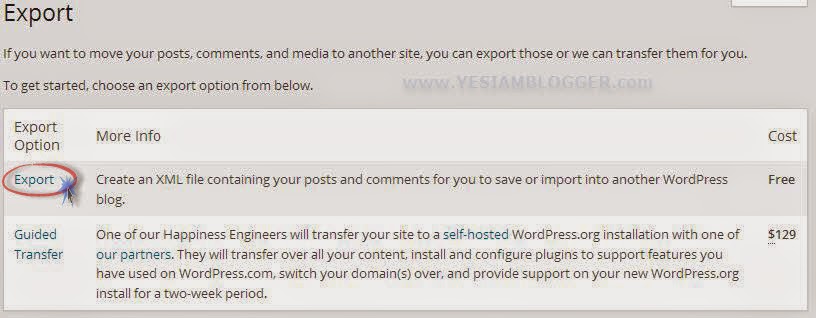
On clicking Tools, you will see a window asking to chose the type of export with respective pricing thereof. Don't mind the second type and Just click the first one Export.


Export File options


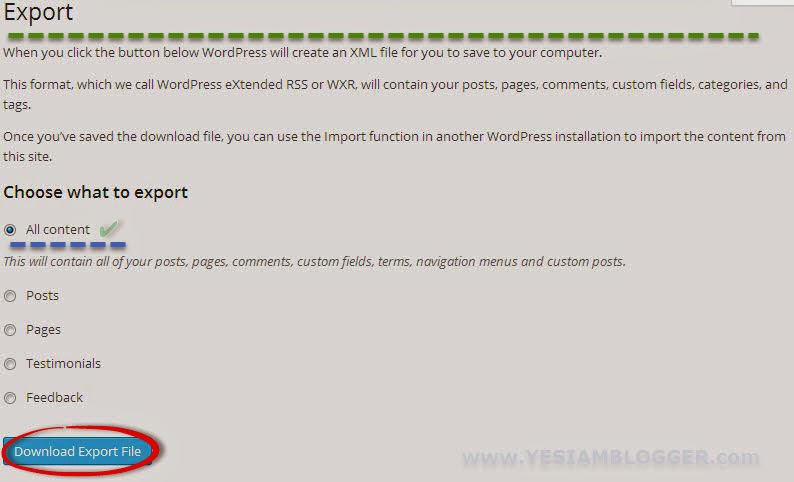
Now when you clicked Export, you are on the screen where you are urged to select the type of content you want to export in the XML file like Posts, Pages, Testimonials and else.


what to export XML


The ideal manner to export XML file is All content. Now click Download Export File and Save that On your Drive.


Import the XML file into your WordPress.org Blog

Now its the time to import overall data into your own hosted WordPress blog. Posts, Pages and comments are going to be live on your blog just with a single click.
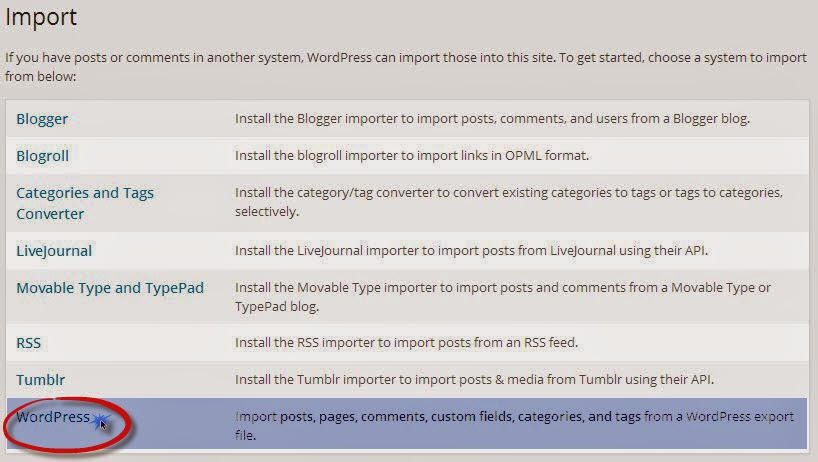
Simply Navigate to the Tools menu and open Import there.

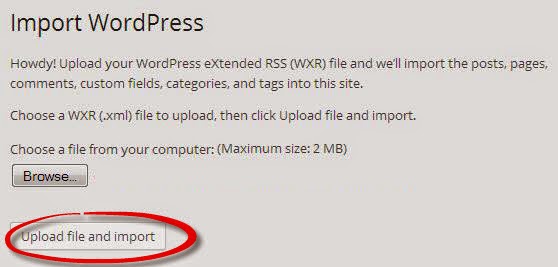
Import Window wp org


Now you're at a stone's throw from your migrated self hosted WordPress blog.

Now select the XML file you've exported from WordPress dot com on your hard drive and click Upload file and Import.

chose file to import


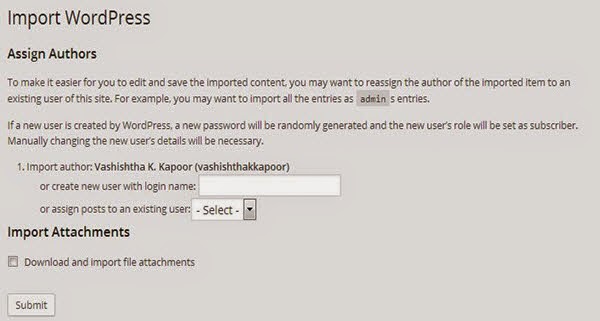
Now you will see the final screen which ask you to select the user under which you have to assign the posts.
Select the admin user or the username of your admin and click Submit.


assign user for posts
Howdy, You're done and I just heard what my WordPress said. "You're done and Now Have Fun!"

Delete WordPress.com blog

Now this is optional that you delete old WordPress.com blog or retain it with your WordPress account.  To delete your old .com blog, easily navigate to Tools >> Delete Site. And click Delete. Now you will receive an email asking you to confirm site delete. Confirm and delete it.


Hope my first WordPress tutorial was able to deliver what you really need.

Tuesday, 7 April 2015

Elegant Recent Post Widget for Blogger

So far as I consider, Recent post widget is not yet available on default widgets on blogger. WP guys however are leveraged with this widget. Recent post widget helps your blog in two ways. Firstly it create audience engagement with your blog and secondly it inform the perspectives about what you recently have written on your blog. You can fetch posts from other blogs as well but only in case where you're sure that the feed address you're entering is correct.

Recent Post Widget


Recent Posts with Snippet

<div id="hlrpsa">
<script src="https://googledrive.com/host/0B9z9HCzVzJW4UEo0RkVwMmxzUzg">
</script>
<script>
var numposts = 5;var showpostdate = false;var showpostsummary = true;var numchars = 100;var standardstyling = true;
</script>
<script src="http://blog-address.com/feeds/posts/default?orderby=published&amp;alt=json-in-script&amp;callback=showrecentposts">
</script></div><a style="font-size: 9px; color: #CECECE; float: right; margin: 5px;" href="http://helplogger.blogspot.com/2012/04/simple-related-posts-widget-for-blogger.html" rel="nofollow" >Recent Posts Widget</a>
<noscript>Your browser does not support JavaScript!</noscript>
<style type="text/css">
#hlrpsa a {color: #0B3861; font-size: 13px;}
#rpdr, #rpdr a {color:#808080;}
#hlrpsa { color: #999999; font-size: 11px; border-bottom:1px #cccccc dotted; margin-top:-10px; padding-bottom:10px;}
.hlrps a {font-weight:bold; }
.hlrpssumm {}
</style>

Only Title Recent Post widgets

<div id="hlrpsb">
<script style="text/javascript" src="https://googledrive.com/host/0B9z9HCzVzJW4UzA5ZFJYdENQcHc"></script>
<script style="text/javascript">var numposts = 10;var showpostdate = false;var showpostsummary = false;var numchars = 100;var standardstyling = true;</script>
<script src="http://blog-address.com/feeds/posts/default?orderby=published&alt=json-in-script&callback=showrecentposts"></script></div><a style="font-size: 9px; color: #CECECE; float: right; margin: 5px;" href="#" rel="nofollow" >Recent Posts Widget</a>
<noscript>Oops! Make sure JavaScript is enabled in your browser.</noscript>
<style type=text/css>
#hlrpsb a {color: #0B3861; font-size: 13px;}
#rpdr, #rpdr a {color:#808080;}
.bbrecpost2 {
padding-top:6px;
padding-bottom:6px;
border-bottom: 1px #cccccc dotted; }

</style>
Note : Make sure to change the blog-address.com in given snippets with your own blog URL.

Final Words :

This widget is working to many extents and you're asked to confirm the feed host address first before using this widget. In case, you're unable to setup this widget, comment here and let me know. I will try to resolve the issue.

Top 20 Document Submission Websites with High PR

In the Previous post I wrote about Top 4 Video Sharing Websites and In this article we are going to learn and emphasis the usefulness of Document sharing websites. A Search Engine Optimization Expert loves to create links anywhere it is possible and qualitative. It would be the ice on the cake if these sites are giving high quality backlinks. Of course, Some websites like Slideshare and 4shared reward you with high quality contexual backlinks and readership as a result of your dedication towards making an ebook.

There are certain SEO advantages and can not be ignored anyways.


Top 20  Free Document Submission Websites


Readership is the first direct advantage you leverage with these document sharing websites and Backlinks are extra advantageous. The amount of links you get from documents that you upload is unlimited in nature because when you are writing on some topic, there are many other words the meaning of which can not be explained in few words. You can put links to the articles you have written about those complicated words.

Another way to put links in documents is header and footer section. But you ought to be careful about these links. The header and footer shall be used in such a manner that they does not look rude. Just keep it natural.

Beyond these tactics, you are leveraged with a separate author profile where you can put links to your website or blog. If your readers are hooked to your books, they will visit your profile for sure.

Top 5 Free Document Sharing (Submission) Websites

There are many website that offer you to submit your PDFs and DOCs on their server.
Document Submission Websites list 

Final Words :
You can easily get high quality backlinks by submitting your PDFs and Documents on these sites.
Also Read : Top 4  Video Sharing websites (http://bit.ly/1aF8DtJ)

Top 4 Free VIdeo Sharing Websites with High PR Backlinks

Undoubtedly, not only back-links but also well choreographed videos gains popularity and traffic. Backlinking opportunity is the another advantage of these video sharing websites. On these website you can upload videos that are hosted on their servers while you need not to pay them even a penny with some terms.

Here we can state that - "the advantage of uploading videos on these sites is two fold."

Top 4 VIdeo Sharing Websites

YouTube

Youtube is the largest video sharing and uploading website the administrator of which is the most reliable portal - Google. You not only get visitors to watch your video but also get a chance to go viral and show the world about your presence on internet. Every internet blogger or reporter is using YouTube to interact with the world.

Vimeo

Vimeo is another video uploading and streaming website having alexa rank around 30-40 that means huge audience there. Chances to go viral are high and probable. But there are certain limitation in order to remain unbilled for video uploading. With a free account, weekly uploading space is limited to 500MB and Upto 10 videos can be uploaded per day. You can manage maximum of one channel there.

Vevo

The ultimate portal for music lovers and to share music videos is vevo. Alexa rank thereof is not quite good but around 6000 is not a bad figure though. Unfortunately, vevo is not available in certain geographic territories. Advertisement are automatically shown on your uploaded videos and you are not in a position to remove them neither you're remunerated for that as well.

Daily Motion

Daily motion is the well known leading video sharing and streaming website. Mostly people are aware with this website as a adult video sharing but there is much more beyond their anticipations and expectations.

Final Words

As the conclusion of above discussion, we can say that video sharing is beneficial not only for popularity and traffic but also for generating high quality backlinks. Backlinks created on these sites are always high quality and the traffic driven to your website through those links is the secondary benefit of these website. So, i always suggest to share one video on all these websites so that you can gather more attention and traffic to your site.

Monday, 6 April 2015

Reasons Why You are losing Followers on Social Media

Your followers on social media are the real potential you've earned with your work on internet. Many times you start losing them and consequence of which are never favorable. Perfect interaction is the inevitability indeed that can never be neglected. Trends and preferences also matters a lot towards your success in gaining followers and maintaining them well. Keeping your followers in contact is the blood for the body of your social media network.

You are losing Followers on Social Media

Discussing why you fail keeping your followers in touch

There are many reason responsible behind you losing followers and can be emphasized as follows:

  • Maybe You are careless about them

    Your followers also need some care to be taken towards them. You can take care of them too just by delivering feeds and tweets they love to re-tweet. otherwise you're useless to them. The have a big Unfollow button to hit and set themselves free from you.
  • You're changing the topic very often

    Your followers are connected and followed you just because you are someone who has identical objectives like them. When you start changing them and make yourself versatile, you lose their trust and they bounce over.
  • Hey man! You are overusing Hashtags

    You probably now the importance of hashtags. Hashtags however are very beneficial to find some audience interested in your topic but over use of hashtags is very illusory. You should expand information before them not your tagging skills. Just post one or two hashtags in each post or tweet.
  • You're not updated regularly

    You always dominate your followers by reaching every feed first and visualizing it before them. You sometime are not updated with the world and hence the crowd leave your behind. 
  • Followers are no more interested

    Social media is not all about you. Your followers are interested in your interests and tastes not in you. So, better to be around the topic and entertain your followers with everything happening in the interest world.

Friday, 3 April 2015

Hide Posts from the Homepage of Blog without Deleting it?

How to Hide Outdated and OLD posts from the homepage of a blog at Blogger is here. You are reading correct. Hiding posts from a specific label from the homepage of your blog is easy and in this way one can wisely keep the homepage of one's blog clean and full of latest update feeds. Every Blogger like to show only active posts on the homepage because the presence of expired freebies posts on the home of a web portal is not a good sign though.
Any blogger never intent to show his/her readers even a lambency of a expired freebie or older news. So there are three methods to hide posts on the home of a web-blog.

Hide Posts from the Homepage of Blog without Deleting it?

How to hide specific posts from the homepage of a blogger blog?

Method 1:

  • For any change in the appearance of a blog at blogger, admin has to enter into the Blogger dashboard. So, Goto Blogger Dashboard.
  • Now Open Template Menu and open edit HTML.
  • Now search for the code given below in the coding by pressing [Ctrl + F].
&lt;div class=&quot;date-outer&quot;&gt;

  • Now replace the code above with the following code snippet.
&lt;div class=&quot;date-outer&quot;
<b:if cond='data:blog.pageType == &quot;index&quot;'>
<b:if cond='data:blog.searchQuery == &quot;&quot;'>
<b:if cond='data:blog.searchLabel == &quot;&quot;'>
<b:if cond='data:post.url == &quot;Post URL&quot;'> style=&#39;display:none;&#39;</b:if>
</b:if>
</b:if>
</b:if>
</div>&gt

  • Make sure to replace Post URL with the post you want to hide.
  • In case, you have to hide more posts paste the below code just above  </b:if></b:if></b:if></div>&gt
<b:if cond='data:post.url == &quot;Your Another Post URL&quot;'> style=&#39;display:none;&#39;</b:if>

  • Again make sure you replace Your Another Post URL with your input. 
  • And so on you can hide more posts. Don't forget to save your template.

Method 2:

  • regardless of the above method, you have to find ]]></b:skin> in the template HTML and paste the below code just above it.
<style>
<b:if cond='data:blog.url == ... >
#YOUR POST ID {display:none}
</b:if>

  • Now replace YOUR POST ID with the 19 digit unique post ID. 
  • Now save your template and your done.

How to hide posts under specific labels on the blogger blog homepage?


  • Look for the below code in template HTML
<b:if cond='data:post.dateHeader'>
<h2 class='date-header'>
<data:post.dateHeader/></h2>
</b:if><b:include data='post' name='post'/>

  • Now replace the code  with below coding.
<b:if cond="data:blog.url == data:blog.homepageUrl">
<b:if cond="data:post.labels == &amp;quot;&amp;quot;">
<b:if cond="data:post.dateHeader">
</b:if></b:if></b:if><br />
<h2 class="date-header">
<data:post .dateheader=""></data:post></h2>
<b:include data="post" name="post">
</b:include>
<b:loop values="data:post.labels" var="label">
<b:if cond="data:label.isLast">
<b:if cond="data:label.name != &amp;quot;&lt;span style=&quot;color: red;&quot;&gt;Your Blog Label Name&lt;/span&gt;&amp;quot;">
<b:if cond="data:post.dateHeader">
</b:if></b:if></b:if></b:loop><br />
<h2 class="date-header">
<data:post .dateheader=""></data:post></h2>
<b:include data="post" name="post">
</b:include>
<b:else>
<b:if cond="data:post.dateHeader">
<h2 class="date-header">
<data:post .dateheader=""></data:post></h2>
</b:if>
<b:include data="post" name="post">
</b:include></b:else>
  • Make sure you replaced the Blog Label Name. Now save your template and enjoy.

Final Words.
If above tutorial helped you even a bit, don't bounce without leaving your comment below. Your words may help hundreds of bloggers.

Thursday, 2 April 2015

Adsense Tumblr blog Approved in Two Days

Writing an Adsense tumblr blog (microblog) is very easy. Getting Adsense approved and working on your website is very easy but you need to read some documents before starting.

Goto Adsense Program policy before applying for that and then think of starting or read the whole post and start earning just after a day or two.

Let me emphasis a bit on the advantages using TUMBLR for your new blog.

First and the biggest fact is that, "Tumblr is Free".

All you need is just to create an account and start from a blank tumblr blog.

Second is the custom permalink option which is very useful in on site optimization.
adsense tumblr blog approval in two days

You probably know that Blogger does not support fully customized permalink and place YY/MM/ before every permalink.

You are going to leverage the experience of using it.

Third one is , "Its Just FUN using TUMBLR".

Tumblr have a lot of post types which you can use to beautify your blog just with a basic template.

Now is the time to start with your own tumblr blog.


HOW TO CREATE ADSENSE Tumblr BLOG?


Below is a list, you'll need to setup AdSense on your blog.

  • A Tumblr Account
  • A Newly Purchased Domain
  • A Working Network Connection
  • Content to write on your blog
  • A working Phone Number and your residential Address
  • A Working Brain to observe everything happening in your industry.


I will tell you about the setup of a blog that can result in a quick approval by adsense.


First of all open your tumblr account.


In case you are not yet doing microblogging or Tumblr, create one for yourself.


Do Not change the template.


Just Customize it with your TItle, Icon, Description and content.


Post at least 10 good and unique post about a specific topic.


Read some blogging secrets to start it out.


(http://www.yesiamblogger.com/2015/03/dont-copy-my-style.html)


(http://www.yesiamblogger.com/2015/02/best-strategy-to-promote-blog.html)


(http://www.yesiamblogger.com/2015/02/things-you-must-do-and-not.html)


(http://www.yesiamblogger.com/2015/02/5-qualities-of-perfect-blogger.html)


(How to create a good readership of your blog?)


Create three pages in your blog by clicking advance.

Name of those three pages are "About, Privacy Policy and Terms of Use, Contact"

Write true and fair contact information and details.

Use the Phone no there you will put when you'll signup for Adsense.

Now to get a sample of Privacy policy, look up Google for "Example of Privacy Policy" add your industry in the keyword when your search the sample of a Privacy policy page. You will get the appropriate content to paste on your privacy policy page.

make sure your change all example.com URL's with your own purchased URL.

Now you are all set.

Just use CUSTOM Domain in TUMBLR and point your Domain to your tumblr blog.

Now apply for the Adsense publisher account.

In case you did a little fault, you will be disapproved.

Following above guide will result in a approved Adsense Account.

Now Enjoy and Happy Blogging!

Wednesday, 1 April 2015

Blogging as a Million $ opportunity

Blogging as a million $ opportunity


What is blogging and How to Profit from it?

Blogging is an interactive form of publishing content on the web. It comes from the term "web log." The act of blogging dates back to the late 1990s, and has become a dominant way of self-publishing in the 2000s. According to an estimate there are more than 300million blogs on the World Wide Web at the beginning of the year 2015.

Blogging started in late 90s as a hobby. People used to share their thoughts, special talent or expertise in various fields with people through blogs. Now blogging has evolved as a full time profession. It is giving employment to the people in various ways.

Blogging has various stakeholders such as hosting service providers, content writers, web developers & graphic designers. The good thing about blogging is that it is providing opportunity all the stakeholders. In fact blogging is a complete ecosystem and blogger is at the core of that.

Due to the penetration of Internet to the rural areas blogging is becoming as a source of income. It can be a full time profession as well. To start blogging very small initial investment is required so those who are still in college or in some sort of job are also earning through it.

How to make money BloggingHow to make money from blogging?

For the beginners the best way to start earning is serving advertisements on their blogs. Bloggers get paid when people visit the blog and click on the advertisements. Many publishers pay for visits only though the payments are very low.

ADsense and ways to make money from bloggingAdSense and other methods.

Google’s Ad serving programme which is called AdSense is considered as the most reliable among all the Pay per Click Programmes. As it pays highest Pay per Clicks. Though to start earnings from AdSense your blog must have quite a good number of visitors to it. Other alternatives to Adsense are Chitika, …etc.

If your blog has a larger number of visitors then affiliate marketing is a better option to earn money. In affiliate marketing you have to directly subscribe the concerned affiliate programme. As it is risk free compare to AdSense earning programme.

ShoutmeloudSuccessful Bloggers

There are people who are earning in Millions like Huffintonpost.com is such a blog who is earning in millions. In countries like India which has a huge population and Internet penetration is increasing people are adopting blogging as a sfae source of income. For example the blog shoutmeloud.com , whose owner is an engineer and he is earning more than 10000$ a month.


Saturday, 28 March 2015

How to Add a Module on the Homepage of a Blog in Blogger

Single page website development is the trend of the era and you will be searching something like this to enhance the homepage of your blog.

This CODE helps you adding the module either in Hardcode or a customizable widget area on the layout section of your blogger dashboard.

This also will tell you - "How to Add Widget in the layout of your dashboard?"


To put any module or a snippet of web page module on the web page insert your coding between


<b:if cond='data:blog.url == data:blog.homepageUrl'>
Here
</b:if>

Now in the place of "Here"  put your module and save your template.


You can use a client logo slider in the homepage at the bottom of the posts, the coding of which is below. the coding will look like the image below :

<!-- slider -->
<div class='slider-container'>
<div class='slider-container-c'>
  <h2>Our Leading Clients</h2>
  <p>Awesome people who trust us</p>
<ul id='slider'>
<li><a href='#'><img src='http://www.webdesignandsuch.com/posts/jquery-logo-slider-ticker/logos/1.jpg'/></a></li>
<li><a href='#'><img src='http://www.webdesignandsuch.com/posts/jquery-logo-slider-ticker/logos/2.jpg'/></a></li>
<li><a href='#'><img src='http://www.webdesignandsuch.com/posts/jquery-logo-slider-ticker/logos/3.jpg'/></a></li>
<li><a href='#'><img src='http://www.webdesignandsuch.com/posts/jquery-logo-slider-ticker/logos/4.jpg'/></a></li>
<li><a href='#'><img src='http://www.webdesignandsuch.com/posts/jquery-logo-slider-ticker/logos/5.jpg'/></a></li>
<li><a href='#'><img src='http://www.webdesignandsuch.com/posts/jquery-logo-slider-ticker/logos/6.jpg'/></a></li>
<li><a href='#'><img src='http://www.webdesignandsuch.com/posts/jquery-logo-slider-ticker/logos/7.jpg'/></a></li>
<li><a href='#'><img src='http://www.webdesignandsuch.com/posts/jquery-logo-slider-ticker/logos/8.jpg'/></a></li>
</ul>
</div>
</div><!-- /slider -->

Above coding in the place of "Here" in the first code snippet is not enough to get the slider work for you. You need to put Jquery and CSS for this slider.

Below is the CSS code along with Jquery thereof.


<script type='text/javascript'>
$(document).ready(function(){
$(&#39;#slider&#39;).bxSlider({
ticker: true,
tickerSpeed: 5000,
tickerHover: true
});
});
</script>


And the CSS is Here


* Logo Slider */
/*
jQuery Logo Slider Ticker
by http://webdesignandsuch.com
build with code from http://bxslider.com
*/
.bx-wrapper img {
border: 1px solid #ECECEC;
}


#slider {
list-style: none;
padding: 0px;
}


#slider img {
width: 200px;
height: 125px;
margin: 0px;
display: inline-block;
}


#slider li {
width: 210px;
}


.slider-container-c {
width: 980px;
margin: auto;
}


div.slider-container {
text-align: center;
background-image: url(http://www.acquacreativestudio.com/sites/emblem/img/pattern.jpg);
padding-top: 10px;
padding-bottom: 70px;
}


div.bx-wrapper {
width: 980px!important;
}


div.bx-window {
width: 980px!important;
}


div.slider-container-c h2 {
text-transform: uppercase;
font-size: 25px;
margin-bottom: 0px;
}


div.slider-container-c p {
font-size: 14px;
margin-top: 5px;
margin-bottom: 40px;
}
 Remember CSS and Jquery is subjected to be used before </head> and CSS between <style></style>


In case of any problem, comment below and let me know. I will try to solve that for you.

Friday, 27 March 2015

How to Add Social Sharing Button in Blogger Posts


Giving your audience an option to share the post through their social network account with their friends helps to many extents in getting viral with your posts. Any of your post can go viral with the help of this simple blogger social widget.

These buttons are really helpful in case where you have no traffic from search engines and your blog consist really really interesting feeds people love to read and share.


You need style sheet coding for these button. So, that's here.

.btt-socialshare{margin:10px 0}
 .btt-socialshareul {
margin:0!important;padding:0!important;
list-style:none;list-style-type:none;line-height:1}
.btt-socialshareul li{
margin:0 10px 0 0 !important;padding:3px 8px!important;
list-style:none!important;list-style-type:none;display:inline-block}
.btt-socialshareul li.btt-share-this{
padding:3px 8px 3px 0 !important}
.btt-socialshareul li.btt-facebook{
background:#3c5b9b!important}
.btt-socialshareul li.btt-twitter{
background:#2daae1!important}
.btt-socialshareul li.btt-google{
background:#f63e28!important}
.btt-socialshareul li.btt-stumbleupon{
background:#eb4924!important}
.btt-socialshareul li.btt-digg{
background:#1b5891!important;margin:0!important}
.btt-socialshareul li a,.btt-socialshareul li a:visited{
color:#fff!important;
text-decoration:none!important;font-style:bold}
.btt-socialshareul li a:hover,.btt-socialshareul li a:active{
color:#fff!important;text-decoration:underline!important}
.btt-socialshareul li p{margin:0}

Now is the time to find out where you have to place that.
Just After the Title or just at the end or both.
Find Below Code

<div class='post-header-line-1'/>


Paste Below Code just after it.


<b:if cond='data:blog.pageType == "item"'>
<div class='btt-socialshare'>
<ul class='btt-socialshareul' id='btt-socialshareul'>
<li class='btt-share-this'><p>Share This Article </p>
</li> <li class='btt-facebook'>
<a expr:href='&quot;http://www.facebook.com/share.php?v=4&amp;src=bm&amp;u=&quot; + data:post.url + &quot;&amp;t=&quot; + data:post.title' onclick='window.open(this.href,&quot;sharer&quot;,&quot;toolbar=0,status=0,width=626,height=436&quot;); return false;' rel='nofollow' title='Share this on Facebook'>
<p>Facebook</p></a> </li> <li class='btt-twitter'> <a expr:href='&quot;http://twitter.com/home?status=&quot; + data:post.title + &quot; -- &quot; + data:post.url' rel='nofollow' title='Tweet This!'><p>Twitter</p></a> </li> <li class='btt-google'> <a expr:href='&quot;https://plus.google.com/share?url=&quot; + data:post.url' onclick='javascript:window.open(this.href, &quot;&quot;, &quot;menubar=no,toolbar=no,resizable=yes,scrollbars=yes,height=600,width=600&quot;);return false;' rel='nofollow' title='Share this on Google+'><p>Google+</p></a> </li> <li class='btt-stumbleupon'> <a expr:href='&quot;http://www.stumbleupon.com/submit?url=&quot; + data:post.url + &quot;&amp;title=&quot; + data:post.title' rel='nofollow' title='Stumble upon something good? Share it on StumbleUpon'><p>Stumble</p></a> </li> <li class='btt-digg'> <a expr:href='&quot;http://digg.com/submit?phase=2&amp;url=&quot; + data:post.url + &quot;&amp;title=&quot; + data:post.title' rel='nofollow' title='Digg this!'><p>Digg</p></a> </li> </ul> </div>
</b:if>

Now Save your template and enjoy using this widget. 

Thursday, 26 March 2015

IceGram Review Best Social Counter Plugin for Bloggers

Search engine optimization however is the essence of Today's blogging environment but the importance of Social Media Optimization can not be ignored. Social Media Widgets and Plugins are playing tremendous part therein. In high competitive environmental niche, social networks are the best traffic source. Social Counter plugin, IceGram is really nice to be used on a website.

There are numerous social counter widgets and plugins available on many websites like Addthis, Sharethis and IceGram.

Critically Appraising +Icegram, I found minimized bugs in that plugin. The numbers of plus points are many in this plugin. Majority of bloggers use +WordPress now and hence +Icegram  social counter and allrounder social media plugin is made exclusively for WordPress websites and blogs.

www.icegram.com/download
IceGram Review Best Social Counter Plugin for Bloggers

Size

IceGram does not take even 1MB in your hosting disk space.Easy to install. Just upload and enjoy.

Perfect HelloBar

IceGram provide a easy hello bar without and credit link in it. Hellobar are the ways to improve the blog engagement and email list building. Conditional hello bar is also available in this plugin to use on the right place and the right time. IceGram provide preset and best practiced hellobar themes to chose one from where the +hellobar.com does not allow to edit the theme of the hello bar. 

Timed Hello Bars

Timed hello bar is the best feature i really like. You can schedule more that one hello bar on a single session. Which means more and more disclosure of the content by the way of hello bars.

All popups Types

Scheduling many pop ups at one time is also one of the most decent feature of this plugin. The campaign creation allows to set the theme of the pop up box, Text in it and many more customization are also available.

Unlimited CTA's

The most precious feature in Icegram is no limit of Call to actions. You can use as many CTA's as you want. I am using some of these on my personal blog and found it really helpful.

No Need to Become a Coding Expect

One ought not to be a HTML, Java Script, PHP and jquery coder to use this plugin. Even a noob can use this wordpress plugin with ease.